📍Navigate To:Settings›Organization Settings›Access
About Access
Access allows inviting or modifying platform users, as well as viewing available platform roles in the system.
Users Tab
The Users tab provides a centralized view for managing platform users within your organization. From here, you can invite new users, edit or delete existing ones, and assign platform roles to control access levels. The table displays each user's status (active, pending invite, etc.), creation date, and assigned roles, with filtering options to quickly find specific users.
If your organization uses SSO, you may not be able to fully manage users in the platform. You may need to manage users in your SSO provider.
Add a new User
- Click the
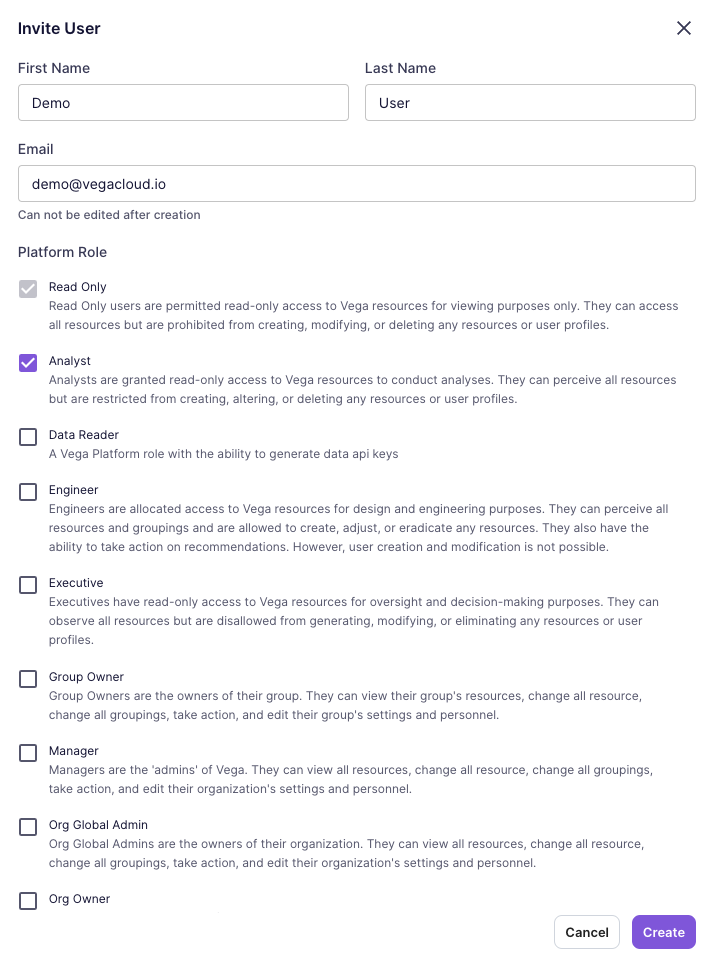
Invite User button on the right-hand side of the page. This will open a modal to input user information.

- Supply the required user information: First Name, Last Name, and Email. Optionally select any number of Platform Roles that will apply to the user.
- Click the
Create button. A user will be generated in the platform. An invite will be to the user's email with further instructions to complete onboarding. Once complete, the user can log into the Vega Platform.
Edit a User
- In a user's row, select
Edit from the available options in the Actions column.
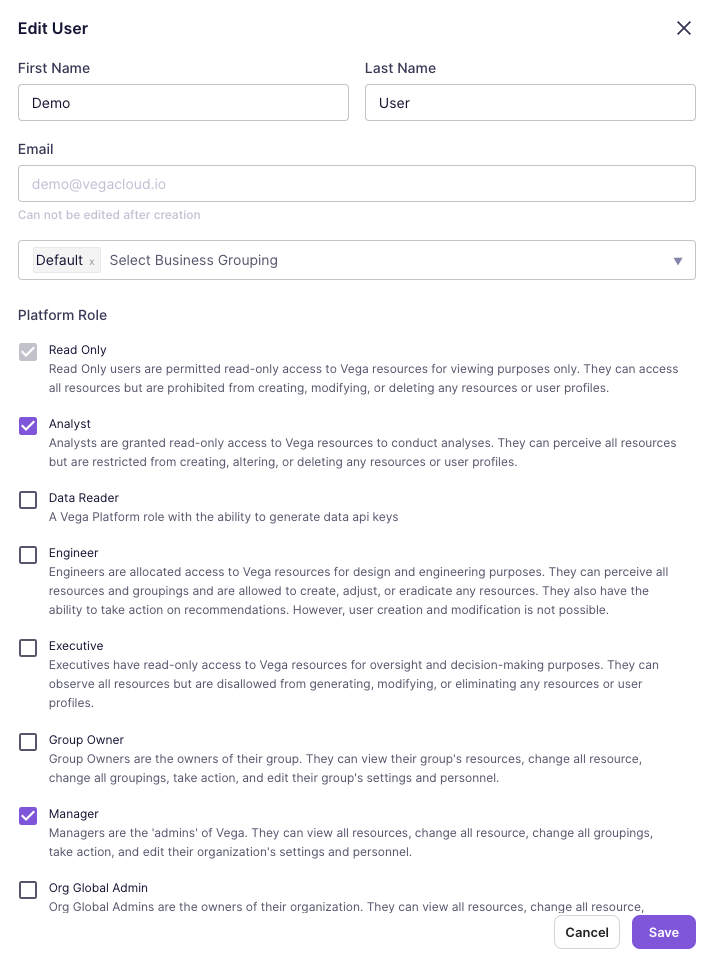
- Make any desired edits to First Name, Last Name, Business Groupings, or Platform Roles.
NOTE: A user's Email cannot be edited after creation.
- Click the
Save button to complete the edits.
Delete a User
- In a user's row, select
Delete from the available options in the Actions column.
- Click the
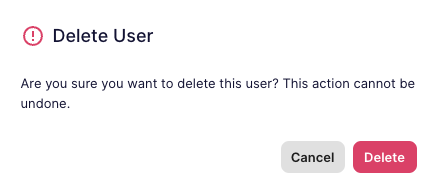
Delete button in the confirmation dialog to delete the user from the Vega Platform.
Delete Multiple Users
- Select multiple users by clicking the checkbox in the first column of the table for each user to be deleted.
- Once multiple users are selected, a
Delete Selected Users button will show above the table (next to the Invite User button).

- Click the
Delete Selected Users button.
- Click the
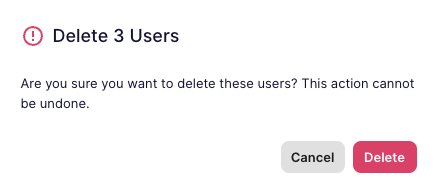
Delete button on the confirmation dialog to delete the selected users from the Vega Platform.
Roles Tab
The Roles tab displays all available roles in your organization and their associated permissions. Each role defines a specific set of capabilities, allowing you to control what users can view and do within the platform. From here, you can review role details, see which users are assigned to each role, and understand the permissions each role grants.
Custom roles may be created to meet your specific needs. If you would like to create a custom role, please contact your Vega Customer Success Manager.
Roles and Permissions Table
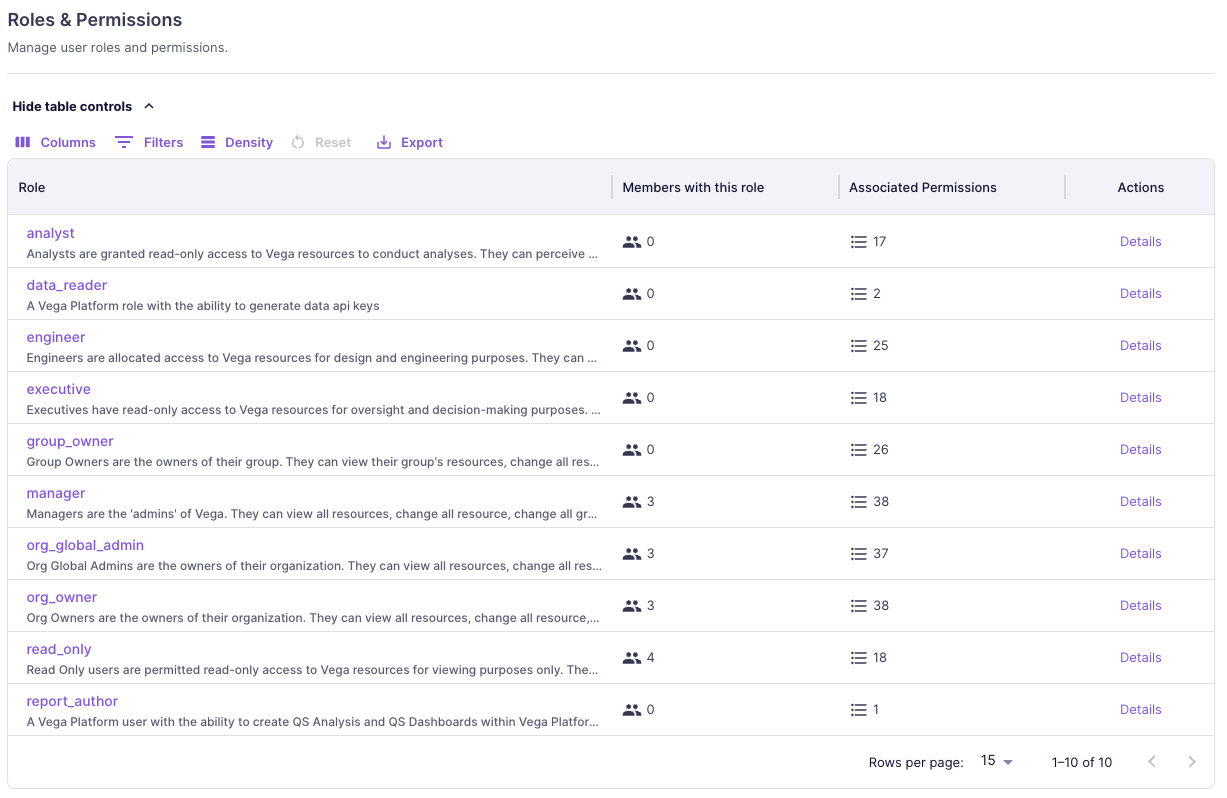
The table lists the roles available in the Vega Platform. Each role shows a high-level description of the role, the number of users with the role, and the number of associated permissions for the role:
Role Details
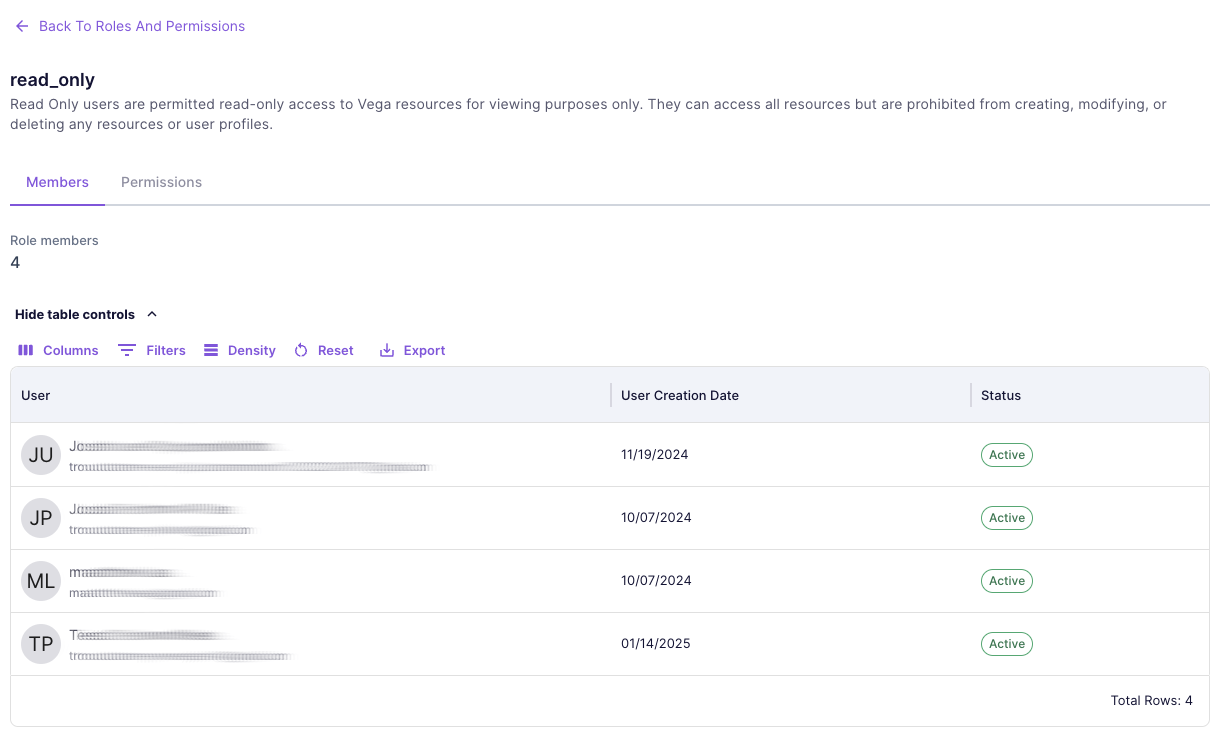
Clicking on the "Details" link in the Actions column will show a detailed view for that role, which has two tabs.
Members Tab
The Members tab lists all users that have been associated to the role, including name, email, creation date, and status.
Permissions Tab
The Permissions tab lists all the detailed permissions that are associated to the role.

Roles and Permissions Summary
The following is a summarized view of roles that are available by default, as well as the permissions associated to each role.
read_only
Read Only users are permitted read-only access to Vega resources for viewing purposes only. They can access all resources but are prohibited from creating, modifying, or deleting any resources or user profiles. This is the default role of every user.Permissions
- get_actions
- get_business_units
- get_organization
- get_resources
- get_resource_pools
- get_spaces
- get_tags
- get_workloads
- get_parking_policy
- get_scheduled_events
- get_notifications
- get_business_unit_types
- get_self
- get_provider_accounts
- get_banners
- dismiss_banners
- share_reports
- get_cross_realm_grants
- access_cross_realm_portals
- generate_sso_links
analyst
Analysts are granted read-only access to Vega resources to conduct analyses. They can perceive all resources but are restricted from creating, altering, or deleting any resources or user profiles.Permissions
- get_actions
- get_business_units
- get_organization
- get_resources
- get_resource_pools
- get_spaces
- get_tags
- get_workloads
- get_parking_policy
- get_scheduled_events
- get_notifications
- edit_notifications
- get_business_unit_types
- get_self
- get_provider_accounts
- get_banners
- dismiss_banners
- track_banner_analytics
- share_reports
- get_cross_realm_grants
- access_cross_realm_portals
- generate_sso_links
- view_comment
- create_comment
- edit_comment_self
- delete_comment_self
executive
Executives have read-only access to Vega resources for oversight and decision-making purposes. They can observe all resources but are disallowed from generating, modifying, or eliminating any resources or user profiles.Permissions
- get_actions
- get_business_units
- get_organization
- get_resources
- get_resource_pools
- get_spaces
- get_tags
- get_workloads
- get_users
- get_scheduled_events
- get_parking_policy
- get_notifications
- edit_notifications
- get_business_unit_types
- get_self
- get_provider_accounts
- get_banners
- dismiss_banners
- track_banner_analytics
- share_reports
- get_cross_realm_grants
- access_cross_realm_portals
- generate_sso_links
- view_comment
- create_comment
- edit_comment_self
- delete_comment_self
engineer
Engineers are allocated access to Vega resources for design and engineering purposes. They can perceive all resources and groupings and are allowed to create, adjust, or eradicate any resources. They also have the ability to take action on recommendations. However, user creation and modification is not possible.Permissions
- get_actions
- edit_actions
- get_business_units
- get_organization
- get_resources
- get_resource_pools
- get_spaces
- edit_spaces
- get_tags
- edit_tags
- view_comment
- create_comment
- edit_comment_self
- delete_comment_self
- get_workloads
- edit_workloads
- get_parking_policy
- edit_parking_policy
- get_scheduled_events
- edit_scheduled_events
- get_notifications
- edit_notifications
- get_business_unit_types
- get_self
- get_provider_accounts
- edit_provider_accounts
- get_banners
- dismiss_banners
- track_banner_analytics
- share_reports
- get_cross_realm_grants
- access_cross_realm_portals
- generate_sso_links
group_owner
Group Owners are the owners of their group. They can view their group's resources, change all resource, change all groupings, take action, and edit their group's settings and personnel.Permissions
- get_actions
- edit_actions
- get_business_units
- edit_business_units
- get_organization
- get_resources
- get_resource_pools
- edit_resource_pools
- get_spaces
- edit_spaces
- get_tags
- edit_tags
- get_workloads
- edit_workloads
- get_parking_policy
- edit_parking_policy
- get_users
- edit_users
- get_scheduled_events
- edit_scheduled_events
- get_notifications
- edit_notifications
- get_business_unit_types
- get_self
- get_provider_accounts
- edit_provider_accounts
- get_banners
- dismiss_banners
- track_banner_analytics
- share_reports
- get_cross_realm_grants
- create_cross_realm_grants
- edit_cross_realm_grants
- access_cross_realm_portals
- generate_sso_links
- view_cross_realm_audit
- view_comment
- create_comment
- edit_comment_all
- delete_comment_all
org_global_admin
Org Global Admins are the owners of their organization. They can view all resources, change all resource, change all groupings, take action, and edit their organization's settings and personnel.Permissions
- get_organization
- get_parking_policy
- manage_api_tokens
- edit_users
- view_cross_realm_audit
- edit_resource_pools
- get_banners
- get_tags
- edit_scheduled_events
- edit_workloads
- get_actions
- get_notifications
- dismiss_banners
- get_workloads
- edit_parking_policy
- edit_provider_accounts
- get_self
- edit_notifications
- get_resources
- edit_federation_settings
- edit_comment_all
- delete_comment_self
- create_cross_realm_grants
- get_all_business_units
- create_comment
- get_business_unit_types
- edit_recommendation_exclusions
- get_all_organizations
- access_cross_realm_portals
- get_users
- get_all_users_organization_access
- edit_actions
- edit_spaces
- get_recommendations
- admin_cross_realm_users
- get_recommendation_categories
- get_cross_realm_grants
- view_comment
- get_policies
- edit_comment_self
- edit_business_units
- edit_cross_realm_grants
- edit_policies
- get_business_units
- edit_business_unit_types
- generate_sso_links
- track_banner_analytics
- get_scheduled_events
- get_spaces
- share_reports
- edit_user_organizations
- edit_tags
- delete_comment_all
- get_provider_accounts
- get_resource_pools
- revoke_cross_realm_grants
manager
Managers are the 'admins' of Vega. They can view all resources, change all resources, change all groupings, take action, and edit their organization's settings and personnel.Permissions
- get_organization
- get_parking_policy
- manage_api_tokens
- edit_users
- view_cross_realm_audit
- edit_resource_pools
- get_banners
- get_tags
- edit_scheduled_events
- edit_organizations
- edit_workloads
- get_actions
- get_notifications
- dismiss_banners
- get_workloads
- edit_parking_policy
- edit_provider_accounts
- get_self
- edit_notifications
- get_resources
- edit_federation_settings
- edit_comment_all
- delete_comment_self
- create_cross_realm_grants
- get_all_business_units
- create_comment
- get_business_unit_types
- edit_recommendation_exclusions
- get_all_organizations
- access_cross_realm_portals
- get_users
- get_all_users_organization_access
- edit_actions
- edit_spaces
- get_recommendations
- admin_cross_realm_users
- get_recommendation_categories
- get_cross_realm_grants
- view_comment
- get_policies
- edit_comment_self
- edit_business_units
- edit_cross_realm_grants
- edit_policies
- get_business_units
- edit_business_unit_types
- generate_sso_links
- track_banner_analytics
- get_scheduled_events
- get_spaces
- share_reports
- edit_user_organizations
- edit_tags
- delete_comment_all
- get_provider_accounts
- get_resource_pools
- revoke_cross_realm_grants
msp_global_admin
MSP Global Admins have full administrative access across managed service provider environments. They can manage organizations, users, cross-realm access, and all platform resources.Permissions
- get_organization
- get_parking_policy
- manage_api_tokens
- edit_users
- view_cross_realm_audit
- edit_resource_pools
- get_banners
- get_tags
- edit_scheduled_events
- edit_organizations
- edit_workloads
- get_actions
- get_notifications
- dismiss_banners
- get_workloads
- edit_parking_policy
- edit_provider_accounts
- get_self
- edit_notifications
- get_resources
- edit_federation_settings
- create_banners
- edit_comment_all
- delete_comment_self
- create_cross_realm_grants
- get_all_business_units
- create_comment
- get_business_unit_types
- edit_recommendation_exclusions
- get_all_organizations
- access_cross_realm_portals
- get_users
- get_all_users_organization_access
- edit_actions
- edit_spaces
- get_recommendations
- admin_cross_realm_users
- create_organizations
- get_recommendation_categories
- get_cross_realm_grants
- view_comment
- get_policies
- edit_comment_self
- edit_business_units
- edit_cross_realm_grants
- edit_policies
- get_business_units
- edit_business_unit_types
- generate_sso_links
- track_banner_analytics
- get_scheduled_events
- get_spaces
- share_reports
- edit_user_organizations
- edit_tags
- delete_comment_all
- get_provider_accounts
- get_resource_pools
- revoke_cross_realm_grants
org_owner
Org Owners are the owners of their organization. They can view all resources, change all resource, change all groupings, take action, and edit their organization's settings and personnel.Permissions
- get_organization
- get_parking_policy
- manage_api_tokens
- edit_users
- view_cross_realm_audit
- edit_resource_pools
- get_banners
- get_tags
- edit_scheduled_events
- edit_organizations
- edit_workloads
- get_actions
- get_notifications
- dismiss_banners
- get_workloads
- edit_parking_policy
- edit_provider_accounts
- get_self
- edit_notifications
- get_resources
- edit_federation_settings
- create_banners
- edit_comment_all
- delete_comment_self
- create_cross_realm_grants
- get_all_business_units
- create_comment
- get_business_unit_types
- edit_recommendation_exclusions
- get_all_organizations
- access_cross_realm_portals
- get_users
- get_all_users_organization_access
- edit_actions
- edit_spaces
- get_recommendations
- admin_cross_realm_users
- create_organizations
- get_recommendation_categories
- get_cross_realm_grants
- view_comment
- get_policies
- edit_comment_self
- edit_business_units
- edit_cross_realm_grants
- edit_policies
- get_business_units
- edit_business_unit_types
- generate_sso_links
- track_banner_analytics
- get_scheduled_events
- get_spaces
- share_reports
- edit_user_organizations
- edit_tags
- delete_comment_all
- get_provider_accounts
- get_resource_pools
- revoke_cross_realm_grants
report_author
A Vega Platform user with the ability to create QS Analysis and QS Dashboards within Vega Platform.Permissions
- get_actions
- get_business_units
- get_organization
- get_resources
- get_resource_pools
- get_spaces
- get_tags
- get_workloads
- get_parking_policy
- get_scheduled_events
- get_notifications
- edit_notifications
- get_business_unit_types
- get_self
- get_provider_accounts
- get_banners
- dismiss_banners
- track_banner_analytics
- share_reports
- get_cross_realm_grants
- access_cross_realm_portals
- generate_sso_links
data_reader
A Vega Platform role with the ability to generate data api keys.Permissions
- get_actions
- get_business_units
- get_organization
- get_resources
- get_resource_pools
- get_spaces
- get_tags
- get_workloads
- get_parking_policy
- get_scheduled_events
- get_notifications
- get_business_unit_types
- get_self
- get_provider_accounts
- get_banners
- dismiss_banners
- share_reports
- get_cross_realm_grants
- access_cross_realm_portals
- generate_sso_links